
Vonage Business Communications: Pricing Facts Buyers Need
Vonage Business Communications gives small teams big-company phone tools without hardware closets. This review breaks down its plans, standout tools, and daily reliability so buyers can decide with confidence.
Vonage Business Communications Pricing and Plans
Vonage Business Communications sells three main tiers. Mobile starts at $19.99 per user per month and covers unlimited calls, SMS, team messaging, plus 20 third-party integrations across softphone apps for mobile and desktop. Premium follows at $29.99 per user per month with everything in Mobile plus deeper admin controls and more integrations. Advanced adds on-demand call recording, call groups, and supervisor analytics for teams that live on the phone.
Add-ons come through the Vonage Marketplace, where partners price their own extras. Budget for one or two add-ons if the team needs CRM logging or advanced reporting beyond the base bundle.
| Plan | Price per user | Best for |
|---|---|---|
| Mobile | $19.99 | Small teams needing calls, SMS, and messaging |
| Premium | $29.99 | Growing firms wanting deeper controls |
| Advanced | Higher | Phone-heavy teams needing recording and analytics |
Annual billing usually trims the monthly rate, so ask sales for both quotes before signing. Month-to-month costs more but suits seasonal teams that scale seats up and down. Either way, confirm the renewal clause: some contracts auto-renew at list price unless cancelled in writing.
Choosing between Mobile and Premium comes down to integrations and oversight. If the team runs on shared spreadsheets and needs only calls plus messaging, Mobile covers it. Once managers want wallboards, advanced routing, or CRM screen pops for ten-plus seats, Premium pays for itself within a quarter.
Standout Features Worth Paying For
The AI virtual assistant answers routine calls, routes customers, and drafts summaries after each conversation. Teams that want custom flows can build assistants inside Vonage Business Communications without writing code, using the visual AI Studio instead.
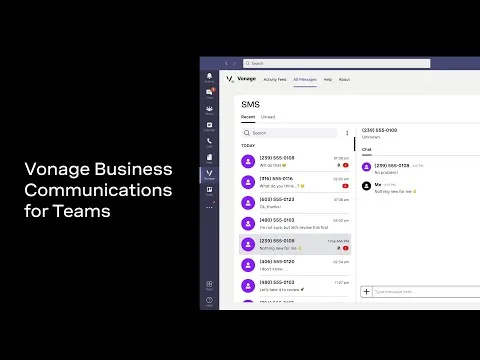
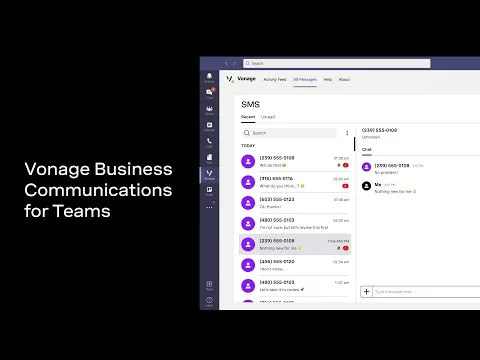
The Microsoft Teams integration inside Vonage Business Communications keeps chats, meetings, and calls in one window, which cuts app-switching for hybrid crews. Softphone apps for desktop and mobile carry the same contacts and history, so staff stay reachable on any device.
Reporting repays the subscription when managers actually open it. Weekly snapshots of missed calls by hour reveal staffing gaps, while per-agent talk time shows who needs coaching. Export the raw logs monthly and the data feeds payroll or bonus math without extra tools.
Beyond Teams, the integration shelf covers major CRMs, helpdesks, and scheduling apps. Click-to-dial inside the CRM cuts misdials, and screen pops show caller records before anyone says hello. Start with one integration, prove the workflow, then add the next.
Compliance-minded buyers should check call recording consent rules in their state before enabling the feature. Announce recording in the greeting, store files within the retention window, and limit playback rights to supervisors. These three habits keep the legal side quiet.
A Note for Auto Businesses
Dealerships and service shops run on appointment reminders, parts calls, and follow-ups, which makes missed calls expensive. Shared inboxes catch after-hours inquiries, while call queues spread Saturday rushes across advisors instead of dumping them on one line. Managers replay recordings to coach service writers on greeting quality.
Mobile twinning matters here: technicians on the lot answer the same business number customers dial, with every conversation logged. Pair that with CRM add-ons and each caller arrives with history attached, so repeat visitors never repeat themselves.
Setup and Call Quality in Daily Use
Admins roll out Vonage Business Communications in stages: first numbers and business hours, then call queues, then integrations. Most offices finish basic setup in an afternoon without an IT visit. The built-in Call Quality report graphs jitter, latency, and drop rates per user, so managers spot network issues before customers complain.
Number porting keeps existing business lines, usually completing within a few working days. Firms that prefer desk hardware can pair supported SIP phones, while everyone else runs fully on softphones. Remote staff get the same extension behavior at home as colleagues hear in the office, including transfers and presence status.
Common Pitfalls to Avoid
The cheapest tier disappoints teams that actually need call recording or analytics, so map must-have tools before choosing. A second mistake is skipping network checks: voice traffic hates congested Wi-Fi, and a ten-minute speed test per site prevents months of choppy calls. Wire desks over Ethernet where possible and reserve bandwidth for voice during peak hours.
Third, train staff on the softphone app on day one. Most failed rollouts trace to users ignoring features they never learned, not to missing technology. A single lunch-and-learn covering transfers, parking, and mobile handoff lifts adoption across the whole roster.
Vonage Business Communications Verdict: Who Should Buy
Service shops, clinics, and dealerships with 5 to 50 seats get the most value: predictable per-user pricing, honest mobile apps, and reporting that proves Vonage Business Communications earns its keep. Very small teams may find Mobile enough, while call centers should price Vonage Business Communications Advanced against dedicated contact-center tools. On features per dollar it stands with the big UCaaS names, with Teams integration as the tiebreaker for Microsoft shops.
Support runs through chat, phone, and a deep knowledge base with video walkthroughs for admins. Security basics include encryption in transit, role-based permissions, and audit logs on upper tiers, which satisfies most small-business compliance checklists without extra purchases.
Buyers switching from landlines should confirm internet upload speed first, since five concurrent calls need only a few megabits. Keep one analog line for alarms or fax if the building requires it, then move everything else to softphones for simpler billing.
Buyers comparing Vonage Business Communications plans should trial Mobile for a week and check the Call Quality report before signing a year. For related reading, see how Teams streamlined business calling and where AI voice tech is heading next, plus the official Vonage Business Communications site for current rates.
How much does Vonage Business Communications cost?
Mobile starts at $19.99 and Premium at $29.99 per user per month, with Advanced priced higher for call-heavy teams. Vonage Business Communications add-ons from the Marketplace cost extra, since each partner sets its own rates for CRM, reporting, and specialty tools.
Does it work with Microsoft Teams?
Yes. The Teams integration merges chats, meetings, and calls into one window, so hybrid crews stop switching apps all day. Admins enable it per user in minutes without reinstalling anything or retraining staff.
Is there a free trial or demo available?
Trial availability changes by quarter, so confirm current offers on the official site before deciding. Most buyers can test core calling, messaging, and the mobile app during a demo period with no hardware required.